
How to Connect AI Tools to Your Business Workflows
More than 40% of agentic AI projects will be canceled by the end of 2027, due to escalating costs, unclear business value, or inadequate risk controls. Agentic AI can select and execute actions toward a goal, which raises the stakes on how it connects to the systems it acts on. Budget discipline and governance controls decide whether a pilot survives contact with production.
Those controls enforce three architecture decisions: the integration pattern that carries the AI, the split between deterministic execution and AI reasoning at each process step, and where humans retain approval authority. Get the decisions right and a pilot has a clear path to production. Get them wrong, and model quality alone will not save it. This article covers how to make each decision and move from pilot to production.
Compare Integration Patterns and Their Trade-Offs
The integration pattern you choose sets your governance model, long-term costs, and exit options. Choose the wrong one and switching requires rewritten pipelines and re-audited controls, costs that are harder to change than a line item.
- Generative steps inside a deterministic pipeline: A fixed workflow calls a large language model (LLM) at specific steps to classify or extract information and produce drafts. This pattern is observable and auditable, and teams can revert it when a model misbehaves, so it works well for controlled enterprise deployments.
- Embedded copilots: Vendors deliver AI inside platforms you already own, such as productivity suites or CRM systems. Native integration can shorten setup, but CIOs still need to assess access governance, auditability, revocation, and whether the platform fits their infrastructure.
- Custom agent frameworks: Developers build agents on open-source or commercial agent frameworks and connect them to enterprise systems through APIs. Custom frameworks give developers more control, and they also require teams to build and maintain more integration code, governance code, and tests. Generic agents without workflow guardrails can produce inconsistent results in complex enterprise processes.
- Integration platform as a service (iPaaS): iPaaS tools can expose established integration flows as controlled agent tools. They retain existing validation and audit mechanisms, including exception handling, and produce a consolidated audit trail. You pay license plus consumption costs for another platform and accept meaningful switching costs.
- Protocol layers: The Model Context Protocol (MCP) standardizes how agents reach tools, while agent-to-agent (A2A) protocols coordinate agents across platforms. Protocol layers can reduce integration lock-in. MCP prioritizes interoperability, so security demands continuous oversight.
Whichever pattern carries the AI, the same design question sits underneath it: which process steps can tolerate a probabilistic answer? Start there.
Separate Deterministic Rules, AI Agents, and Human Judgment
Use deterministic logic for any step that requires the same output for the same input. Deterministic logic follows explicit rules: if X, then Y, every run.
An LLM can generate variable outputs, so identical inputs can produce different results. That variability is the starting distinction, and risk, reversibility, cost, and compliance determine the controls each step needs from there.
Reliability compounds across multi-step processes. Each probabilistic step introduces another opportunity for failure, and a single high-level planning misstep can spread through later reasoning.
The deterministic and probabilistic split should follow the risk in each step. Keep compliance-critical policy enforcement and routing in explicit logic, along with calculations and thresholds. Give AI agents work that genuinely requires interpretation, such as reading and classifying unstructured documents, or drafting and summarizing text.
Use an LLM to analyze ambiguous inputs and recommend a next step, but require rule-based checks before any financial transaction, access change, provisioning action, or system-of-record update. That is the gate.
Require human authorization when an action carries compliance consequences or has a major business impact that is hard to reverse. Human-in-the-loop checkpoints count for little unless the system enforces them.
For audit-sensitive financial workflows, encode approval requirements in the execution path. For example, configure the system to block a high-value journal entry from posting until it records approval from the assigned supervisor.
Move From Pilot to Production
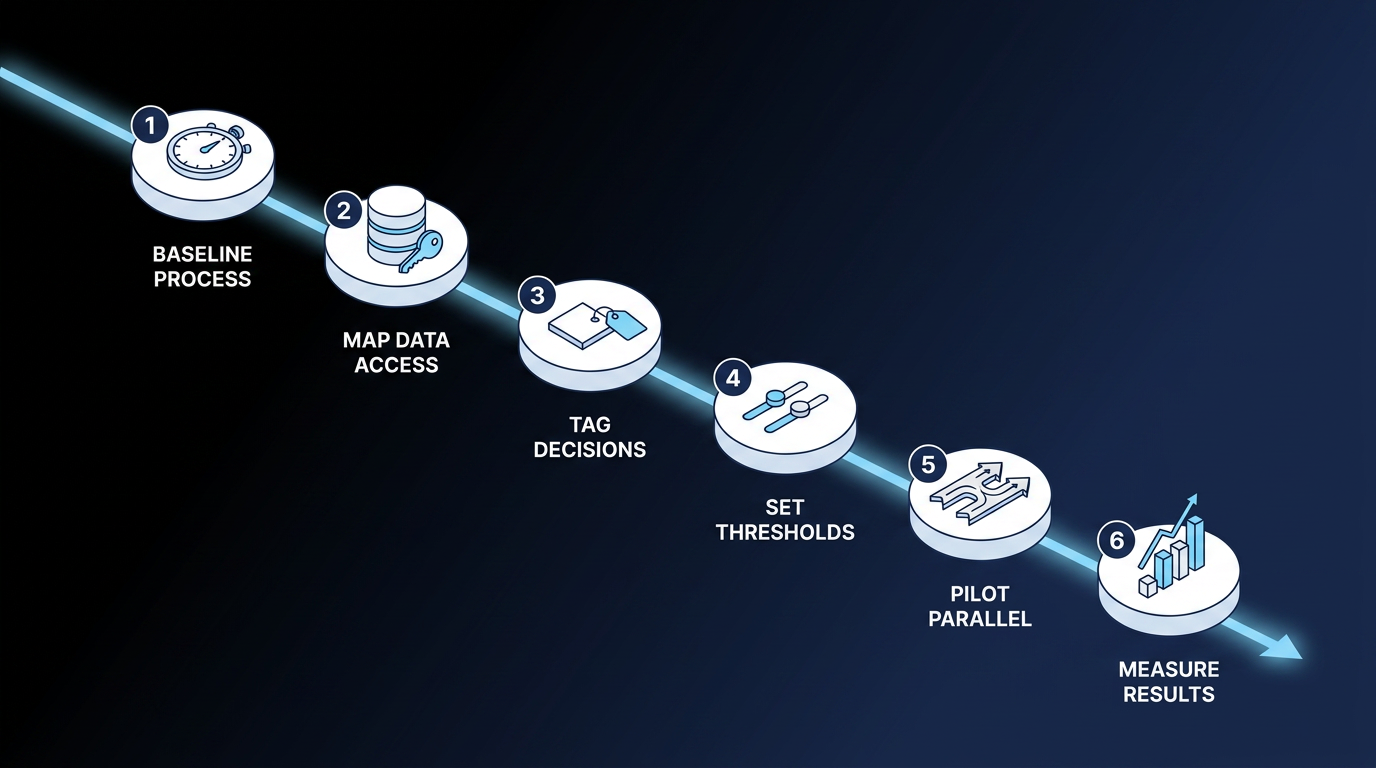
Production deployments often need the workflow redesigned around the AI; adding a model to the existing process is rarely enough. Without a baseline and clear controls, a pilot cannot show whether it reduced errors or improved cycle time and cost. Teams build a stronger funding case by treating the connection like an operating process. Follow these steps in order:
- Baseline the process: Document cycle time, cost per transaction, error rate, and exception volume before anything deploys. Measure before deployment so later comparisons use the same starting period; without that baseline, the team cannot isolate the pilot's effect.
- Map data access: Identify every system of record the workflow touches, apply least-privilege access, and turn on audit logging. This prevents hidden permissions and gives logs that support incident review. Standardize definitions too: the same metric can mean different things in the data warehouse and the CRM, so agree on one definition for the workflow.
- Tag every decision node: Mark each step deterministic or probabilistic. Financial calculations, regulatory reporting, and audit-relevant decisions stay locked to explicit logic; AI can assist earlier, but rules control the decision itself. This keeps variable model output from directly determining audit-sensitive outcomes.
- Set thresholds and checkpoints: When an agent's output falls outside the workflow's configured decision thresholds, route the work to a person. Map escalation paths to named roles, and log every AI decision and human override from day one. Named roles prevent stalled exceptions, and logs make later reviews possible.
- Pilot against the baseline: Run one scoped process in parallel with the current one. This limits disruption and provides a valid comparison; expand only when the numbers hold.
- Measure what the business feels: Compare time or capacity saved against the baseline from step one, along with changes in cycle time and cost per transaction, and tie return on investment (ROI) to those numbers. Budget owners can then decide whether to keep funding it.
Baselining and measurement are easy to skip because both sit outside the engineering work: one happens before the build starts, and the other happens after it ships. Measure first.
Control AI Costs With Budgets, Identity, and Deterministic Gates
Enterprise teams frequently face AI budget pressure as they scale from isolated use cases to wider adoption. AI inference costs per agentic workflow will increase more than fivefold through 2028, as workflows move from simple, assistive tasks to multistep execution that uses far more tokens per run. Inference costs are what it costs to run a model and produce outputs.
Unlike traditional cloud workloads, AI systems can run up costs that compound. An agent that retries without a hard budget can rapidly inflate a bill, and so can a multi-agent chain that does not track the cost of each request.
Costs can multiply.
Route steps that do not need reasoning to deterministic logic. These steps consume no tokens: the units models process and that providers commonly use to meter inference. Put per-workflow budgets in place and track which workflow creates each cost before launch. Not after.
Runtime controls enforce authorization boundaries, while natural-language instructions provide guidance. Configure the runtime, the software that executes the workflow, to block prohibited writes even if the agent recognizes the restriction.
Controls must execute.
Consequential actions need deterministic gates and approvals built into execution. Assign each agent a tracked identity and expiring credentials; this reduces the risk of integrations accumulating unaudited, long-lived service accounts.
Architecture can simplify enforcement. Running a workflow where the data already lives lets teams reuse established access controls and audit trails instead of rebuilding them. Sanofi runs its employee IT support on Elementum workflows built directly on its own Snowflake data platform, with a goal of resolving up to 80% of requests without human intervention. Its data stays on that platform and is never piped into vendor software.
Where Elementum Fits in the Architecture
Your integration pattern and workflow controls decide whether an AI connection reaches production. Agent identities, shadow tools, and token spend from ungoverned pilots get harder to unwind the longer they run. Put these decisions at the front of your roadmap, before the next pilot ships.
Elementum is the AI-native enterprise application platform: the AI-native replacement for legacy SaaS. Our Workflow Engine sequences steps deterministically and calls AI Agents where reasoning is required, so you can swap models, clouds, or tools without rebuilding the underlying process. Non-reasoning steps run as automated logic that never touches a model, and exceptions and approvals route to the people who own them.
We log every request: the agent invoked, the workflow used, and the result produced. This builds agent management into execution instead of adding it afterward. We run natively inside your own data platform, such as Snowflake, using CloudLinks to query source systems in place under your existing access controls.
Your data is always yours. We never train on, replicate, or warehouse your data. Because the deterministic steps consume no tokens and workflows query data in place, nothing is retained at the execution layer once a run ends.
Many of our customers start with one workflow, prove the savings, and expand into adjacent processes. We have the production track record for replacing legacy SaaS at enterprise scale, with named customers including Sanofi, Snowflake, Under Armour, and Elevance Health.
Contact us to map workflow orchestration into your architecture and the rest of your AI roadmap.
FAQs on Connecting AI Tools to Enterprise Workflows
These are the questions IT and operations leaders most often raise when connecting AI tools to their existing workflows.
How do you connect AI tools to existing workflows without disrupting operations?
Connect AI tools without disrupting operations by starting with one scoped, lower-risk process and running it in parallel with the current one. Keep human approval on every consequential action; that prevents a pilot from making irreversible changes while its controls are still under evaluation. Expand only after the pilot beats your documented baseline on error rate or process economics such as cycle time and cost.
Do you need an AI agent or traditional automation?
Whether you need an AI agent or traditional automation depends on the task. Use traditional automation for high-volume tasks that follow the same fixed path every time, and use AI agents where the work requires interpreting unstructured inputs or adapting to context. Many enterprise workflows blend both, with deterministic logic governing the process and agents handling the interpretive steps inside it.
Can you safely connect AI tools to company data?
You can connect AI tools to company data safely with least-privilege permissions that limit access and audit logs for every query that support review. Architectures that read data in place reduce replication between business systems. You also need a model deployment and retention policy that keeps prompts and retrieved context inside the approved environment, to avoid transfers to a model provider. Treat employees entering company data into unsanctioned consumer tools as a separate risk. Assess each tool's access and retention policies before approving its use, since those reviews reveal whether a tool sends or keeps company data outside approved boundaries.
How long should you expect an AI workflow connection to take?
How long an AI workflow connection takes depends on scope, data readiness, integration complexity, and governance requirements. A narrowly scoped pilot on an existing platform can move faster than a full production deployment. Data preparation and validation often set the schedule, since the workflow depends on accurate, usable inputs.
Measuring against a pre-deployment baseline turns the deployment into a defensible ROI case.
Keep Reading
AI Governance Tools: How Enterprises Monitor and Control AI at Scale
8 Best AI Tools for IT Support Ticket Triage
9 Best AI Orchestration Tools in 2026: Enterprise Evaluation Guide
7 Best AI Workflow Automation Tools in 2026
How to Connect AI Tools to Your Business Workflows
9 Best Workflow Orchestration Tools in 2026