Replacing ServiceNow: A Practical Guide for Enterprise IT Leaders

Your ServiceNow renewal is coming up, and this time the number looks different. Tiered commitment levels now shape how much of the platform's AI capability you actually get, and for many enterprises, the math has shifted.
If you're a CIO weighing renewal against renegotiation or replacement, you're not alone. A multi-billion-dollar hard drive manufacturer recently ended a 13-year relationship with ServiceNow, switching to a competing platform after weighing the same trade-offs many enterprises are facing now.
Assess the Forces Putting ServiceNow Replacement on the CIO Agenda
ServiceNow replacement conversations center on whether the platform's pricing direction and AI architecture still align with where your IT estate needs to go.
Compounding Cost Escalation
ServiceNow's commercial model often creates pressure to expand platform use over time, which shapes renewal pressure. The compounding effect can get board-level attention when a large annual subscription is paired with renewal pressure and add-ons for support or AI. Those costs can rise faster than the value teams are getting from the platform at that moment.
Structured negotiation can reduce renewal proposals, especially when the buyer has usage data and contract expertise. That expertise is often specialized enough that IT teams don't have it in-house.
Evaluate Commitment-Tier AI Pricing
ServiceNow restructured its AI packaging in April 2026 so every tier now ships with AI built in by default rather than as a separate purchase. That removes one friction point, but it replaces it with another: the platform now runs on three commitment tiers, Foundation, Advanced, and Prime, and what changes between them isn't whether AI is present but how autonomously it's allowed to act. Moving from assisted AI to fully autonomous workflows means moving up a tier, with the associated cost commitment.
ServiceNow's first-quarter 2026 earnings call reinforced this pattern. Chief Product Officer Amit Zavery described AI Control Tower adoption as driving "the higher ticket price from an ASP perspective" as customers expand usage across the business. That confirms AI Control Tower adoption raises average selling prices as a function of broader deployment, not a hidden add-on fee.
Assess Deepening Platform Lock-In
ServiceNow expanded through Moveworks and is pushing further into CRM and cross-enterprise workflows. Each expansion adds integration work and proprietary data dependencies, making switching harder. Layered portfolio dependency can leave workflow logic and enterprise data, including AI access, increasingly mediated by a small set of vendors. Lock-in compounds as those dependencies deepen.
Evaluate the AI Architecture Behind Every ServiceNow Replacement
Architecture should lead the evaluation. ServiceNow's AI capabilities deliver more value when an organization has already invested deeply in the ServiceNow platform.
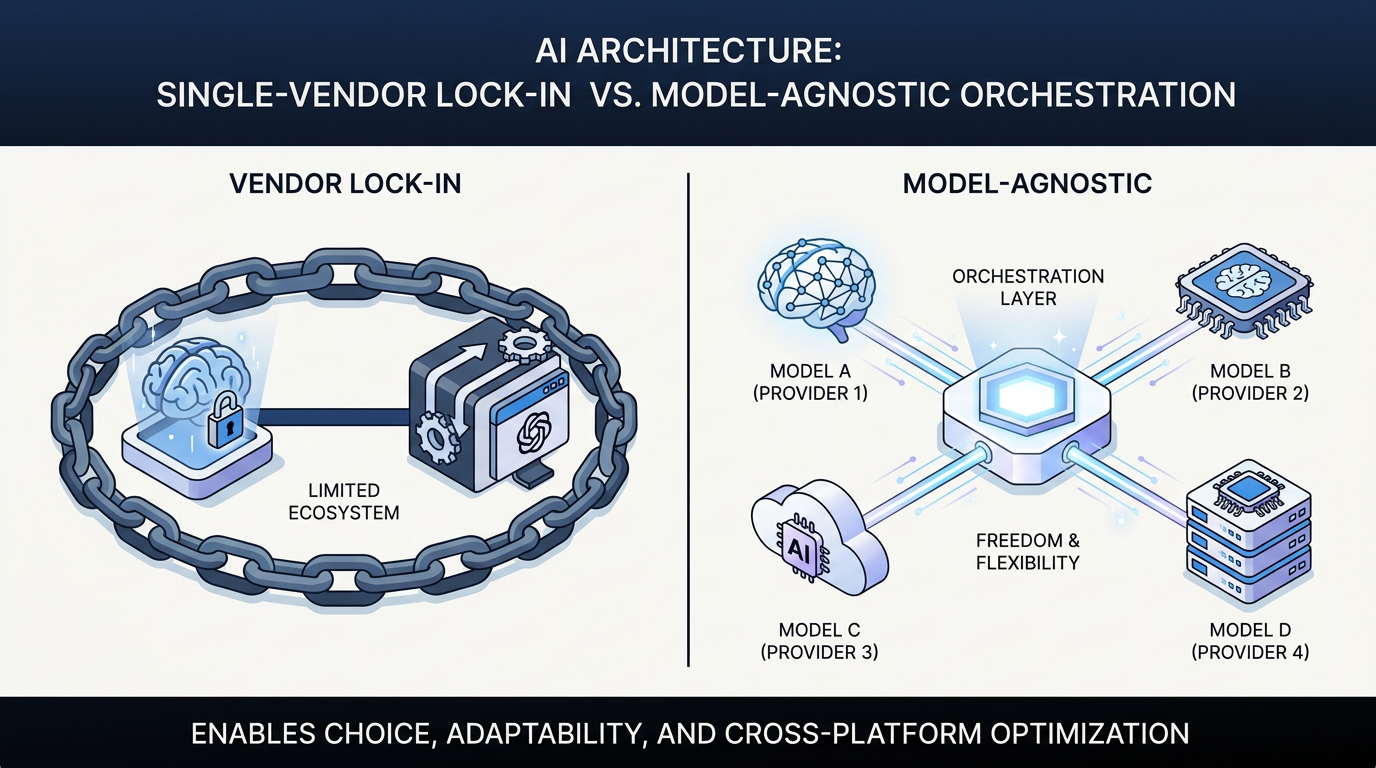
Broader enterprise AI adoption is pushing organizations toward orchestration layers that manage connectivity and data access across models and platforms. That shift changes what a replacement platform needs to do.
Enterprise AI programs may need orchestration across multiple models and platforms. If model access is confined to one vendor's stack, that setup may start to look misaligned with where your AI stack needs to go. ServiceNow's AI capabilities are also tied to named release cycles. For organizations running multiple model providers across different use cases, this can create a lag between frontier model availability and what's accessible inside ServiceNow.
Plan for Migration Risks That Derail ServiceNow Replacements
Understanding why you'd leave is the easier part. Most migrations go wrong during exit planning, especially when teams create new operational problems as they leave the old platform.
Historical Data and CMDB Dependencies
Years of ticket history and configuration item (CI) relationships can be difficult to extract and reconstruct in heavily customized environments. The configuration management database (CMDB), which maps IT asset relationships and dependencies, often presents the highest risk. ServiceNow provides export options for CMDB queries and CI relationship data, though dependency-map exports may require working with the underlying relationship data. Alternative platforms rarely match ServiceNow's CMDB depth out of the box.
In practice, a migration plan often limits historical data migration to compliance-required and active records, archives the rest externally, and runs systems in parallel long enough to validate data integrity before cutover. That scope gives the migration team a safer starting point.
Integration Rebuild and Third-Party Dependencies
ServiceNow integrates with monitoring tools and core enterprise systems, including HR, CI/CD, identity, and asset databases. Most integrations need to be rebuilt or at least reworked, and many require cooperation from third-party system owners outside the migration team's control.
Inventory integrations early. Check API compatibility before migration begins. Rebuild the most operationally critical connections first. Otherwise, hidden dependencies and incompatible APIs tend to surface late, when they are harder to fix without delaying cutover.
Customization Debt
Large ServiceNow deployments can accumulate years of custom workflows and approval chains. Some of that logic may be undocumented. Some may have been built by consultants who have since moved on. That undocumented logic slows migration.
In practice, teams often need to redesign custom automation logic to align with the target platform's native workflow capabilities. Copying automation 1:1 can carry migration baggage forward, since many original customizations were built to compensate for platform-specific limitations that no longer apply.
Regulated organizations, such as financial services and pharmaceutical companies, face an elevated risk of customization debt because data must remain auditable throughout the migration. Any disruption to audit trail continuity creates compliance exposure.
Realistic Timelines
Large enterprise migrations usually take time, especially in heavily customized or regulated environments. Discovery and current-state assessment typically require substantial upfront effort. Compressing that phase often leads to scope overruns because integrations, custom logic, and data dependencies surface late, forcing teams into rework or even re-migrations.
Prioritize the Right ServiceNow Replacement Platform
The replacement evaluation should start with a clear-eyed assessment of whether the problem is the platform or the implementation. Before replacing, evaluate whether the current deployment is underutilized, whether workflows and governance are well configured, and whether the issue lies with the tool or with process maturity. That step helps you avoid paying migration costs to solve a design or adoption problem.
If the evaluation confirms replacement, four criteria separate viable alternatives from lateral moves.
- Model-agnostic AI orchestration: The platform should connect to multiple large language model (LLMs) providers and let you swap models without rebuilding workflow logic. That preserves flexibility as pricing and capability change. Locking into another vendor's AI stack reproduces the problem you're trying to solve.
- Deterministic governance with configurable AI thresholds: AI agents are useful for tasks that require interpretation, like reading unstructured documents or triaging tickets. But approval routing and SLA enforcement need to produce the same result every time, with compliance checks handled through controlled rules. The platform should let you configure exactly where AI acts autonomously and where human review is required.
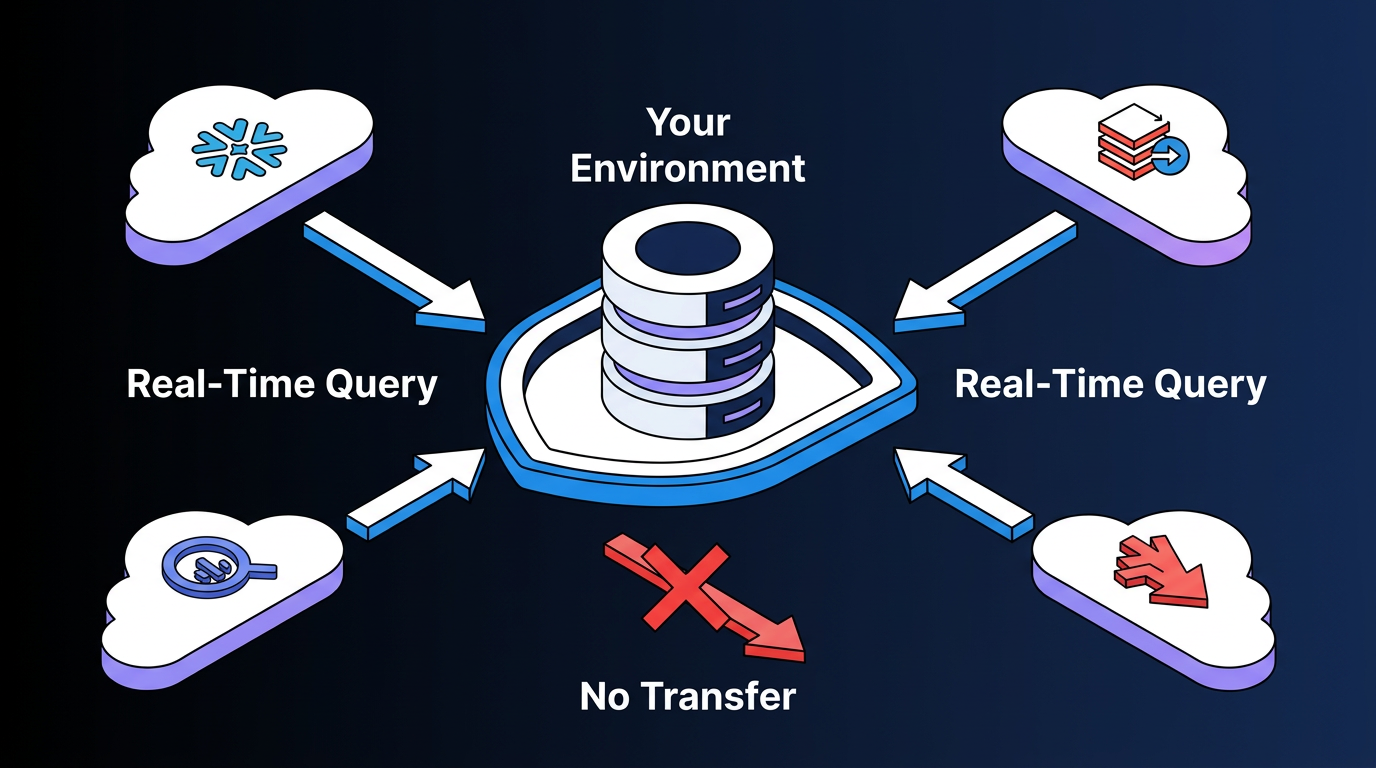
- Data sovereignty by architecture, not policy: Your data strategy should minimize replication and avoid turning the replacement platform into another system of record. If the replacement platform copies or warehouses your data through sync-heavy architecture, you're trading one lock-in vector for another.
- Deployment speed that matches your business case timeline: If budget pressure requires CIOs to prove AI value quickly, a long implementation before the first workflow goes live may not clear the ROI bar in time.
Together, these criteria help distinguish a true architectural upgrade from a lateral platform swap.
Evaluate Elementum for ServiceNow Replacement
Replacing ServiceNow reclaims more than license spend. The compounding costs stem from implementation overhead, reliance on consultants, release-cycle delays, and the loss of agility that comes with workflows locked within a single vendor's architecture. If it's on your agenda, focus the decision on choosing an AI workflow architecture that scales across your technology estate without recreating the same lock-in and cost pressures you're trying to leave behind.
Elementum is built around the architectural principles that matter most when evaluating ServiceNow alternatives. Our Workflow Engine coordinates AI agents with deterministic business rules in every process, with human review available where required.
Deterministic logic governs approval chains and SLA enforcement, with compliance checks handled through controlled rules. AI agents handle interpretive work such as ticket triage and document processing, including contextual recommendations when workflows require them.
Configurable decision thresholds control when AI acts autonomously and when human review is required, with agent actions logged and human-in-the-loop checkpoints available for high-stakes decisions.
We are pre-integrated with OpenAI, Anthropic, Google Gemini, and Snowflake Cortex. You assign different models to different workflow steps and swap them as pricing or capabilities change, without rebuilding the workflow logic. No LLM vendor lock-in.
Our Zero Persistence architecture means we never train on, replicate, or warehouse your data. CloudLinks query data in real time where it already lives across enterprise data environments. We never become your system of record.
Deployment speed is another evaluation point worth weighing against your own timeline expectations. Sanofi is a publicly named customer on the platform, and Sanofi's Global SVP of Digital Strategy and Operations has stated that Elementum quickly turns data into AI-powered workflows, with customer data never leaving Snowflake.
Many of our customers start with one workflow, prove the savings, and expand into adjacent processes. Among orchestration platforms in this category, we have the production track record for replacing legacy SaaS at enterprise scale, with named customers including Sanofi, Snowflake, Under Armour, and Elevance Health.
Contact us to map agentic AI orchestration into your ITSM architecture and the rest of your AI roadmap.
FAQs About ServiceNow Replacement
These are the questions IT leaders most often raise when evaluating a move off ServiceNow.
How long would it take your team to migrate off ServiceNow?
Migration timelines depend heavily on deployment complexity. Large enterprise migrations take time, and heavily customized or regulated-industry deployments can take longer. Discovery often determines the timeline because the current-state assessment and data strategy need to be completed before major migration activity begins.
What happens to your historical ticket data and CMDB when you migrate?
Most organizations don't migrate a full decade of transactional data in one pass. A common approach scopes migration to compliance-required and active records, then keeps the legacy ServiceNow instance running read-only for historical reference while the new platform handles active workflows.
When might it make more sense for you to stay with ServiceNow?
Staying makes sense in a few specific situations: a large user base with deep workflow customizations where migration costs would exceed long-term savings; heavy investment in advanced modules such as HR Service Delivery or IT Operations Management; or stringent compliance requirements that depend on ServiceNow's specific audit granularity.
Can you replace ServiceNow without a full rip-and-replace in your environment?
Yes, you can start by routing new workflows through a separate orchestration layer while keeping ServiceNow for existing ITSM processes. This reduces migration risk and creates a side-by-side comparison period before a full migration decision is made.