
How to Automate Employee Provisioning with IT Software: A Step-by-Step Guide
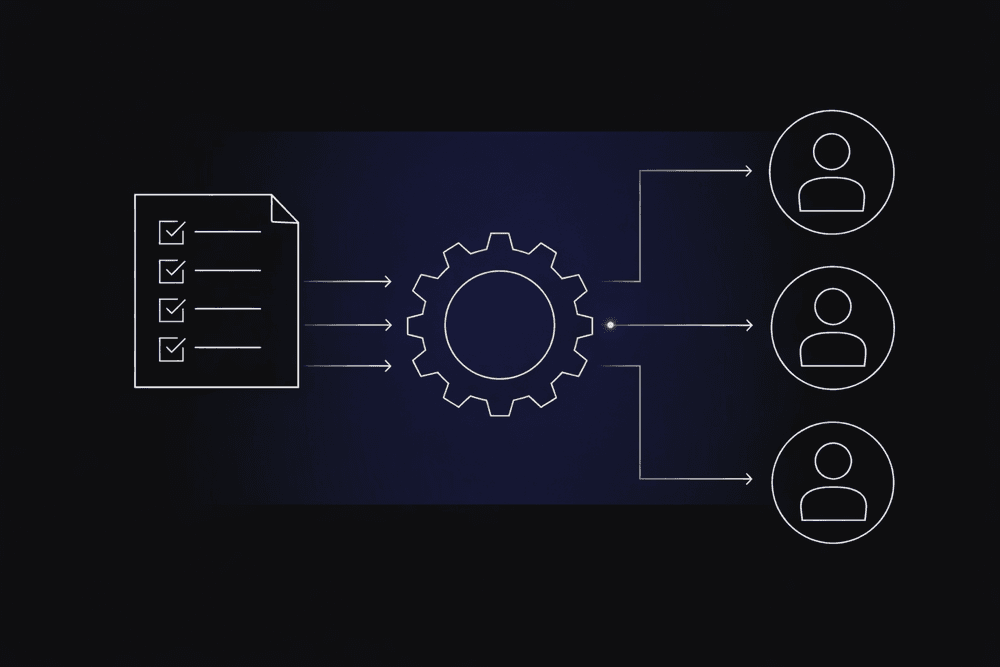
New hires typically need access to core systems such as Active Directory, a Human Resource Information System (HRIS), multiple SaaS applications, Enterprise Resource Planning (ERP) modules, and remote-access tools before they can work effectively. When those accounts are provisioned through manual IT tickets, email chains, and spreadsheet tracking, organizations can end up with access delays, orphaned accounts, and recurring audit pressure.
This guide walks through how to automate employee provisioning with IT software, from initial audit through production rollout, so operations leaders can build a defensible internal business case and execute without a multi-year timeline.
What Employee Provisioning Automation Covers
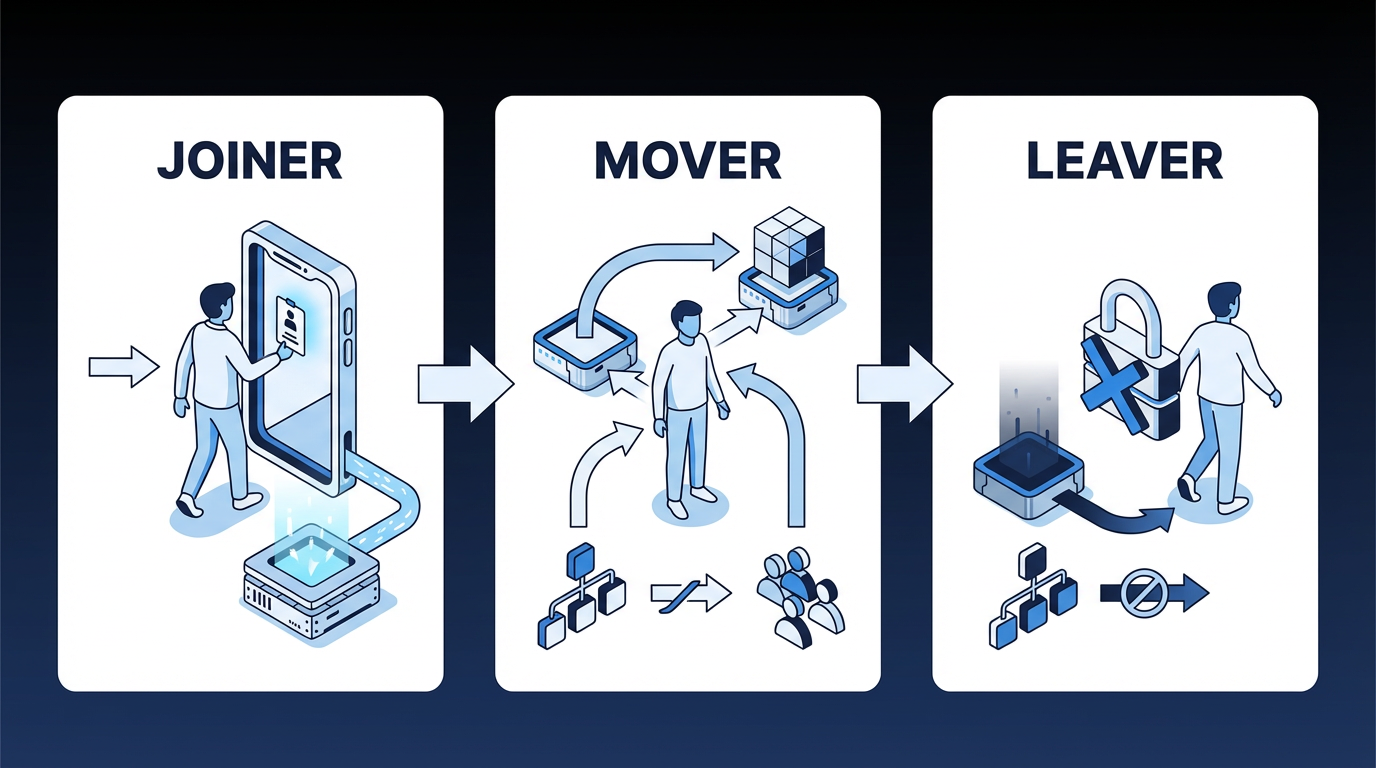
Employee provisioning automation uses workflow automation and identity management systems to create, modify, and revoke employee access across IT systems based on predefined roles, policies, and employment status changes, with minimal manual IT intervention. The process governs the full Joiner-Mover-Leaver (JML) lifecycle:
- Joiners: New hires receive role-appropriate access across all required systems on Day 1 without manual IT tickets.
- Movers: Employees changing roles receive updated access reflecting their new responsibilities, with their old permissions removed.
- Leavers: Departing employees have all access revoked immediately upon termination.
Together, these three flows define the operating scope of provisioning automation. If any one of them is handled inconsistently, access risk and onboarding delays tend to follow.
Identity Governance and Administration (IGA) forms the policy foundation for this process. Workforce identity platforms have increasingly converged IGA, access management, and lifecycle automation into a single governance layer that covers the full scope of users' digital identities and their access rights across the enterprise.
Why Manual Provisioning Fails at Enterprise Scale
In large environments, automation addresses fragmentation that manual processes can't absorb. Enterprises relying on fragmented Identity and Access Management (IAM) tools, legacy VPNs, and manual governance processes face compounding operational inefficiencies, security risks, and compliance challenges.
That burden compounds quickly. Large enterprise environments often manage hundreds of SaaS and cloud-based applications. Onboarding a single identity can involve account provisioning, device setup, payroll integrations, role-based permissions, and compliance training. In environments without automation, employees can wait days or weeks before gaining access to all the systems they need to be productive.
Security exposure shows up in the same process. Persistent risks such as identity sprawl, orphaned accounts, and overprivileged users create an attack surface that grows with every unreviewed account.
Early automation efforts don't always solve the problem. Many HR organizations have adopted workflow tools, yet a substantial share have found those applications fell short of expectations in provisioning environments. General-purpose automation applied to provisioning complexity can still produce incomplete results, which is why a more specific orchestration approach is worth evaluating.
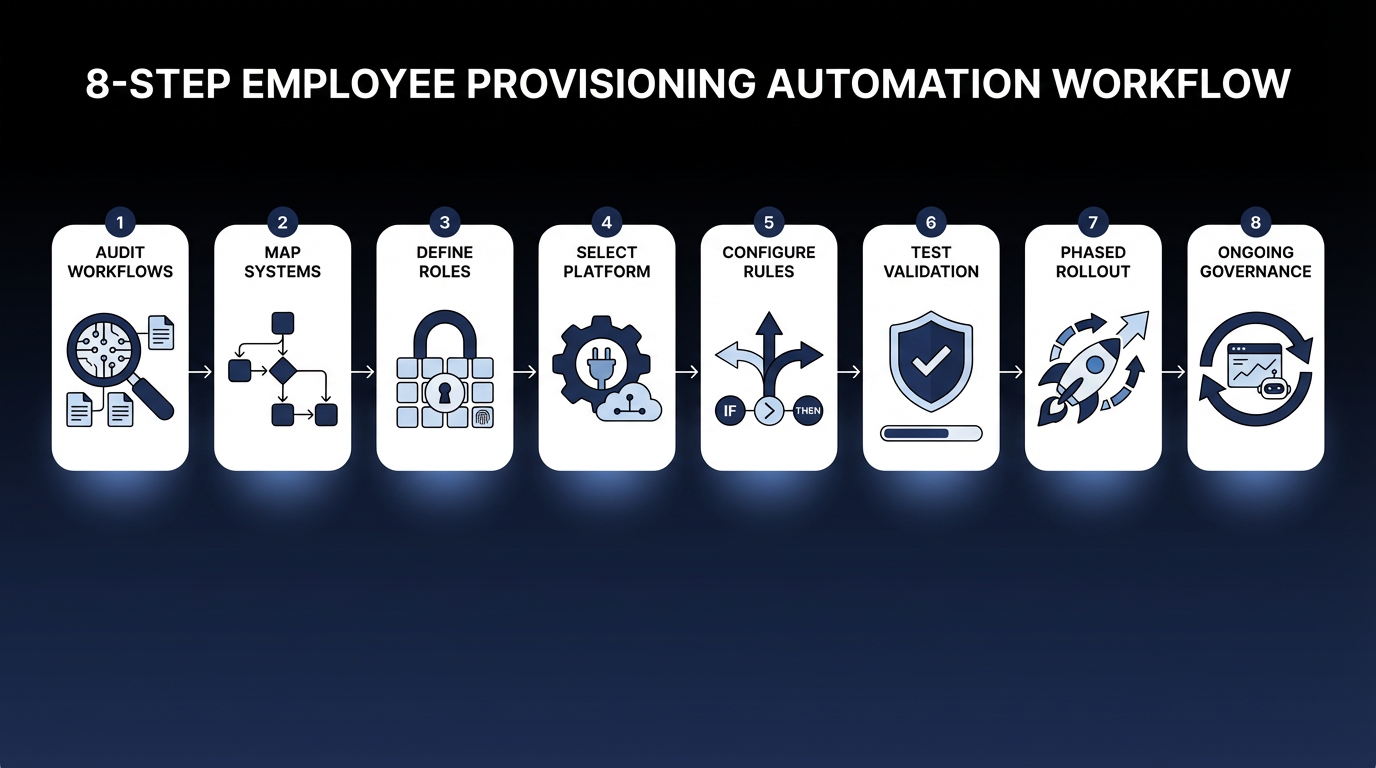
Eight Steps to Automate Employee Provisioning with IT Software
Each of these eight steps builds on the last. Skipping the audit and stakeholder mapping phases is the most common reason automation projects stall after initial deployment, when edge cases and missing integrations surface faster than teams can address them.
Step 1: Audit Current Provisioning Workflows
Before designing the target state, establish a documented baseline. List every system that requires user accounts: Active Directory, Azure AD/Entra ID, HRIS, SaaS applications, and ERP systems. Document the current provisioning method for each: manual tickets, semi-automated scripts, or existing connectors.
At the same time, identify orphaned and dormant accounts and capture average provisioning lead times. Older IGA environments may become harder to maintain over time, so documenting existing technical debt is part of this step.
A critical pitfall is running an IT-only audit. HRIS data quality, including missing job codes, inaccurate department assignments, and delayed termination entries, directly determines provisioning accuracy downstream. HR Operations must co-own this baseline.
Step 2: Map Systems, Data Flows, and Stakeholders
Formally designate your system of record for identity data. Human Capital Management (HCM) systems such as Workday, SAP SuccessFactors, and Oracle are common sources of truth that require clean integration paths to downstream provisioning targets. HR and IT leadership must agree on this designation before integration design begins.
For each target system, document the available integration method: System for Cross-domain Identity Management (SCIM) 2.0, a standard protocol for provisioning user accounts; REST API; Lightweight Directory Access Protocol (LDAP); Java Database Connectivity (JDBC), a standard way for applications to connect to databases; flat file/SFTP; or a proprietary vendor connector. Flag systems without SCIM support early; they may require custom connectors or a manual provisioning fallback.
Build a RACI matrix, a responsibility assignment that clarifies who is responsible, accountable, consulted, and informed, covering HR (identity data owners), IT Operations (provisioning executors), Security/IAM (policy enforcers), Business Unit Managers (access approvers), and Internal Audit (compliance reviewers). Without that clarity, access disputes and exception approvals can stall between HR, IT, and system owners.
Step 3: Define Role-Based Access Policies
This step determines which access each employee type receives automatically and which requires human approval. Start by defining "birthright access": the baseline accounts and entitlements every employee in a given role receives on Day 1 without an approval step. Common examples include email, Virtual Private Network (VPN) access, intranet, and department-specific standard applications.
Before building roles top-down, compare proposed role definitions against actual access patterns to avoid misaligned entitlements. Then define Separation of Duties (SoD) rules: combinations of access that no single user should hold simultaneously, such as the ability to create a vendor record and approve vendor payments in an ERP.
Watch for overly granular role design, which can make Role-Based Access Control (RBAC) harder to manage. Use RBAC where a large number of users need access, turnover is high, or the system is sensitive. Access patterns outside those criteria may warrant alternative models.
Step 4: Select and Configure the Automation System
Selection should prioritize connector depth over breadth. Complex business systems often require more than basic account creation, especially where authorization models are layered or highly customized.
Two primary architecture patterns apply:
- HRIS-as-source, IGA-as-orchestrator, IAM-as-enforcer: The HRIS feeds identity events to an IGA system, which applies policy and pushes provisioning to the IAM layer and downstream applications. This pattern usually fits environments with complex governance requirements and multi-system ERP estates.
- IAM-as-hub: For organizations standardized on Okta or Azure AD, the IAM system serves as the provisioning hub with the HRIS as the upstream trigger. This pattern fits environments where governance requirements are less complex, and the application portfolio is predominantly SCIM-enabled SaaS.
Both models can work if the trigger source, policy layer, and execution layer are explicit. The wrong choice usually shows up later as approval bottlenecks or inconsistent deprovisioning.
In most enterprises, identity governance, access management, and privileged access management still run in separate tools, even though vendors increasingly market them as a single converged stack. Plan the provisioning architecture around that reality: expect to stitch together multiple systems with clear handoffs between them, rather than assume one vendor will cover the full identity lifecycle.
Step 5: Configure Workflow Rules and Approval Chains
Build the governance layer that balances speed with oversight. For joiners, trigger provisioning when the HRIS hire record is created with a future start date, not when IT is notified. This reduces a common coordination failure in onboarding processes.
For movers, implement role reset logic: remove previous role access, provision new role access and flag SoD conflicts for security review before granting. For leavers, automate immediate deprovisioning upon termination: lock accounts first, then run parallel workflows to recover assets and deactivate physical access.
Tier approval requirements by risk level: low-risk access (standard SaaS tools) needs manager approval only; medium-risk (financial systems, personally identifiable information (PII) access) adds application owner approval; high-risk (privileged accounts, sensitive ERP roles) requires manager, security team, and Chief Information Security Officer (CISO) delegation sign-off. Long sequential approval chains can slow access and weaken adoption if the process becomes too cumbersome.
Step 6: Integration Testing and Validation
Test every JML scenario under realistic conditions. Joiner, mover, and leaver workflows each need full end-to-end validation, but edge cases are where automation most commonly breaks in production: rehires (handling existing identity records without reactivating stale entitlements), leave of absence (suspending access without triggering full deprovisioning), dual-role employees, and privileged access holders.
Also test connector failure modes. What happens when a target system is down during a provisioning event? The workflow must fail gracefully, alert operations, and queue for retry; never silently drop the event.
Step 7: Phased Production Rollout
Deploy in a controlled sequence. Start with one business unit that has well-defined roles and a cooperative manager. Run automated provisioning in parallel with the manual process for a short period during rollout, reviewing every event for accuracy. Expand to core high-volume systems (Active Directory, email, VPN) next, then SCIM-enabled SaaS, and finally complex ERP integrations.
Before go-live, notify HR operations of the specific data quality requirements that provisioning automation depends on: clean job codes, accurate start dates, and timely entry of termination records.
Step 8: Ongoing Governance and Improvement
Provisioning programs become less reliable over time without active governance. Run regular access certification campaigns for sensitive systems and periodic reviews for standard access. Without recurring review, outdated access persists, increasing audit pressure.
Enforce a role reset on every position change to prevent role creep, where users accumulate permissions as they change positions without their old access being removed.
Establish a formal process requiring new SaaS applications to have an active provisioning connector or a documented manual provisioning process before production deployment. As application estates expand, provisioning coverage can degrade if that requirement isn't enforced.
Compliance Requirements That Shape Your Provisioning Design
Regulatory frameworks have made automated provisioning a compliance requirement. The proposed update to the Health Insurance Portability and Accountability Act (HIPAA) would mandate notification within 24 hours of any change or termination of a workforce member's access to electronic protected health information. Manual processes can't reliably meet that timing window at scale.
Federal access control standards require that security personnel who administer access control functions not also administer audit functions. Under Article 28 of the General Data Protection Regulation (GDPR), when your provisioning vendor engages a sub-processor, the initial processor remains fully liable for any data protection failures. Accountability in a provisioning data flow depends on the roles and responsibilities assigned to the entities involved.
For organizations regulated under the Sarbanes-Oxley Act (SOX), controls embedded in provisioning and access management processes may be reviewed as part of broader audit and internal control testing. When automated approval gates and SoD checks are built into the provisioning workflow, those controls become part of the audit scope rather than a way to avoid it.
An emerging risk compounds all of this. Auditors are increasingly flagging incomplete provisioning records as a governance gap. Untracked ownership assignments, access rationale, and deprovisioning of ephemeral identities are among the most common issues cited. Organizations that haven't automated human identity provisioning may now face a more complex challenge as AI agent sprawl increases.
How Elementum Supports Employee Provisioning Automation
Provisioning automation works best when identity rules, approvals, and system integrations are governed within a single workflow across HRIS systems, identity providers, ERP systems, SaaS applications, and approval chains, before delays, orphaned accounts, and audit pressure compound further.
Elementum's Workflow Engine is built for that pattern. The Workflow Engine treats humans, business rules, and AI Agents as equal first-class actors: birthright access follows deterministic rules; sensitive access routes through configurable human-in-the-loop approvals; and AI-driven interpretation tasks, such as classifying non-standard access requests or flagging anomalies, can be handled within the workflow. The no-code visual builder helps operations and IT teams configure and update provisioning workflows without custom development.
Our patented Zero Persistence architecture addresses the data sovereignty concern at the center of every provisioning workflow. Your employee data stays in your environment. Elementum does not train on customer data, replicate it, or warehouse it.
CloudLinks connect to data platforms such as Snowflake and Databricks, as well as more than 200 data sources, in real time. Enterprise systems such as SAP, Salesforce, and Oracle connect through native and API-based integrations. Row-level and column-level security policies govern access, and every agent action is logged to support auditability in regulated environments such as SOX, HIPAA, and GDPR.
Elementum deploys first workflows in 30 to 60 days, depending on integration complexity and data readiness.
Provisioning failures almost always trace back to the same gaps: identity rules that aren't enforced across systems, approval chains that don't route to the right people, and governance that wasn't designed before the first workflow went live. Elementum addresses all three in a single orchestration layer. If your team is ready to automate employee provisioning without data migration, vendor lock-in, or consultant dependency, contact us to scope your first workflow.
FAQs About Automating Employee Provisioning with IT Software
How Long Does It Take to Automate Employee Provisioning?
Implementation timelines vary by scope. Access service-level agreement (SLA) improvements after automation can be significant, but actual rollout time depends on the number of systems, approval paths, and edge cases in scope. Organizations that start with a single business unit and expand in phases typically reach full production faster than those attempting enterprise-wide rollout from day one.
Can Employee Provisioning Be Automated Without Replacing Existing HR and IT Systems?
Yes, automation tooling often layers on top of existing identity providers and HRIS systems rather than requiring full replacement. The orchestration layer connects to current systems such as Workday, SAP, Okta, and Active Directory and coordinates provisioning events across them without a rip-and-replace project.
What Is the Difference Between Employee Provisioning and Identity Management?
IAM systems store user information and determine who should have access to what. Provisioning engines handle the operational execution: creating, updating, or deleting accounts in response to triggers.
Which Provisioning Tasks Are Safe to Fully Automate, and Which Need Human Approval?
Birthright access, such as email, VPN, and standard SaaS productivity tools for standard roles, can usually be fully automated. Non-standard access requests, financial systems, PII access, and privileged accounts should follow higher-risk approval paths that include manager and security reviews.
How Does Automated Provisioning Handle Contractors Who Aren't in the HRIS?
Contractor identities often originate from other source systems, such as vendor management systems or secondary HR modules, and have different access policies. Design their provisioning as a separate workflow with its own triggers, approval chains, and automatic deprovisioning tied to contract end dates.
Keep Reading

AI Guardrails: How to Govern What AI Agents Can Access, Decide, and Do

What Is AI Agent Sprawl And How to Contain It
Human-in-the-Loop vs. Human-on-the-Loop: When to Use Each for Enterprise Workflows
What Is Agentic AI Orchestration? An Enterprise Guide
How To Set Up an AI-Powered IT Service Desk Workflow
9 IT Process Automation Tools: Top Platforms for Automating IT Workflows