
How To Set Up an AI-Powered IT Service Desk Workflow
Your service desk handles a high volume of tickets every month. A significant share are password resets and access grants that team members still resolve manually, one ticket at a time. Triage, routing, and context gathering absorb hours that could be devoted to harder problems, and the resulting utilization pressure pushes service desk team members toward burnout.
This guide covers how to set up an AI-powered IT service desk workflow: from assessing your current maturity and data readiness, to deploying classification and routing, integrating your existing ITSM tools, and building the governance layer that keeps autonomous AI actions auditable at scale.
What Is AI-Powered IT Service Desk Automation?
AI service desk automation is the use of AI agents, deterministic business rules, and human-in-the-loop oversight within a single orchestrated workflow to classify, route, and resolve IT service requests and incidents. The key difference from legacy ITSM lies in scope: AI Agents do more than just send tickets to a knowledge base article. They can support end-to-end workflows such as resetting passwords in the identity provider, provisioning access in the directory, and updating user records in the Human Resource Information System (HRIS).
Forms-and-workflow-driven ITSM hits a structural ceiling when ticket volumes increase or process complexity grows. An orchestration layer like Elementum sits above your existing ITSM tools and coordinates AI Agents, business rules, and human decisions across them without replacing what you've already built.
Where Does an IT Service Desk Break Down Without AI?
Before deploying AI, define the specific bottlenecks you want automation to address.
- Manual triage absorbs hours at scale. A published TEI study on service management platforms found meaningful time savings compared with legacy systems, with automated categorization, self-service intake, and templated workflows accounting for a large share of that recovered capacity. If you don't reduce this manual triage work first, team members stay trapped in queue management instead of resolution.
- Repetitive Tier 1 requests consume a disproportionate amount of capacity. Password reset requests can represent a meaningful share of help desk effort. For organizations processing large monthly volumes of tickets, that single category can consume a significant portion of service desk spend. If you leave these requests fully manual, the requests keep crowding out higher-value work.
- Burnout drives turnover that compounds cost. High utilization pressure correlates with a higher risk of turnover, and replacement costs compound the financial impact when team members leave. Automating Tier 1 resolution reduces the volume that drives utilization pressure high enough to trigger turnover in the first place. If you ignore utilization pressure, labor cost and service quality usually worsen at the same time.
All three problems feed each other. Rising volume increases utilization, which increases turnover, which increases cost per ticket, which makes the next budget cycle harder to defend. AI-driven orchestration breaks that cycle by removing repetitive work from the queue entirely.
How To Set Up an AI-Powered IT Service Desk Workflow
Each step in the setup process depends on what came before it. Skipping the readiness assessment or treating governance as an afterthought are the most common reasons enterprise deployments stall before they scale.
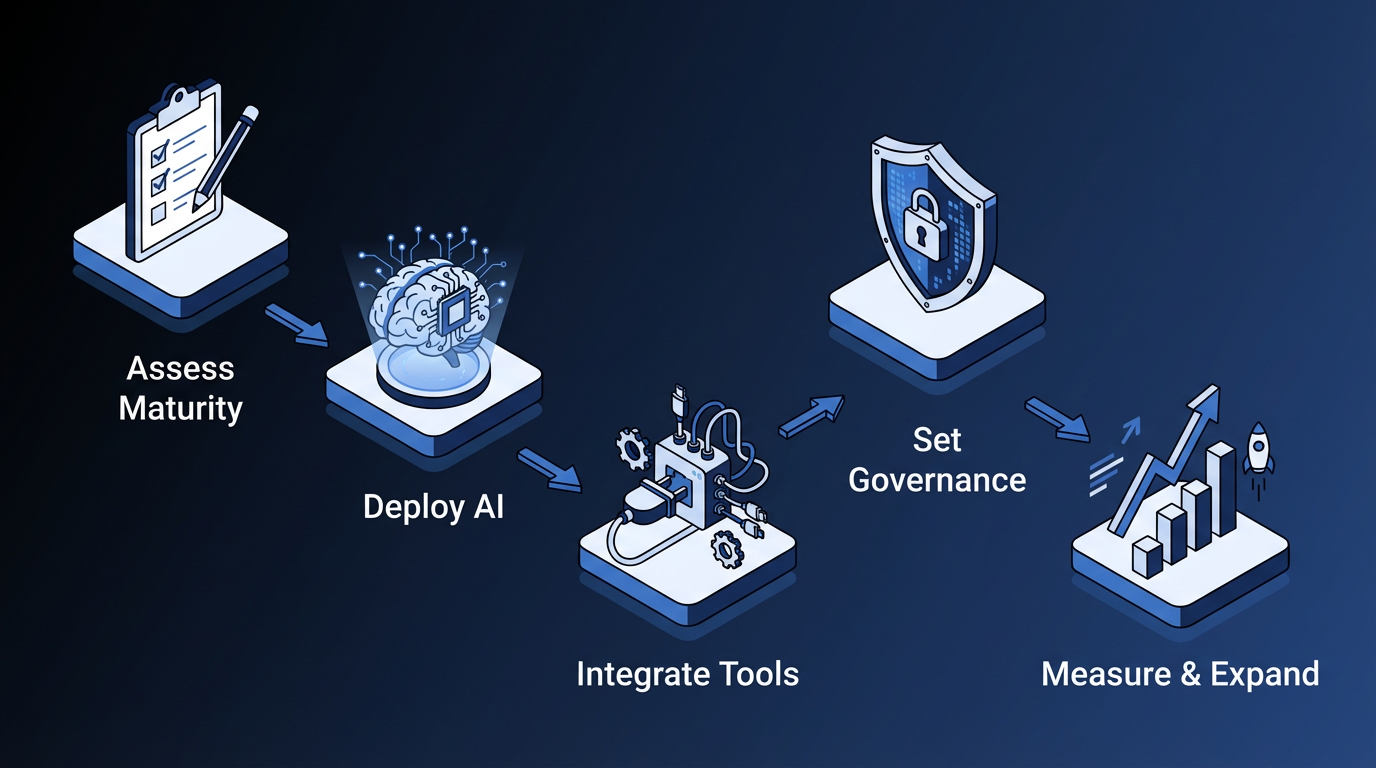
Step 1: Assess Workflow Maturity And AI Readiness
Assess the operating model before you automate it. AI inherits the weaknesses already present in your service management process.
Start with an ITIL 4 (IT Infrastructure Library) assessment at the Service Value System (SVS) level. The SVS assessment examines how decisions are made, how value streams are coordinated, and how improvement is sustained across the entire service organization. A practice-level check evaluates individual ITIL practices, such as Incident Management or Problem Management, on their own. AI automation inherits governance and coordination weaknesses from the overall service value system, so a practice-level check alone may not surface the gaps that cause deployments to stall.
Before any vendor evaluation, validate four prerequisites:
- Ticket categorization taxonomies are clean and consistent
- Historical ticket data is available and labeled
- Existing ITSM workflows are documented well enough to automate
- A knowledge base exists for AI resolution suggestions to draw from
Without these prerequisites, classification models inherit inconsistent labels, workflows break at exception paths, and measurement gets harder after go-live. Clearing these basics first gives later automation steps a cleaner operating baseline.
Establish pre-AI metric baselines for at least one full business cycle: time to first response, first-contact resolution, mean time to resolution (MTTR), service level agreement (SLA) compliance, escalation rate, and cost per ticket. Gartner says over 40% of agentic AI projects will be scrapped by 2027 due to unforeseen costs or inability to achieve projected ROI, often because no baseline existed. Without these baselines, you can't measure impact after deployment.
Step 2: Deploy AI Classification And Routing
In most service desks, classification and routing account for the highest concentration of immediate, repetitive work. Treat classification and routing as the first deployment phase, with autonomous resolution reserved for a later phase once routing is stable.
Deploy AI classification models trained on your historical ticket data, configure sentiment detection to flag urgent or frustrated users, and set up AI-driven routing rules to direct tickets to the right queue.
Ticket categorization and routing are separate from autonomous resolution. Routing a password reset ticket to the right queue helps. Resetting the password in the identity provider, confirming the reset with the user, and closing the ticket without human intervention is a different capability entirely, and is usually where larger-capacity recovery occurs.
Elementum's AI classification analyzes incoming requests, such as support emails, categorizes the issue, and routes it to the appropriate team with structured handoffs and confidence-based controls. Configurable AI vs. human decision thresholds trigger human review when classification falls below a defined confidence level, so ambiguous cases do not move forward without oversight.
Step 3: Integrate Your ITSM And Automation Tools
Integration determines whether AI resolves work across systems or adds another layer to manage. The goal is coordinated execution across the tools your team already uses.
Enterprise deployments benefit from integration patterns that keep status, context, and audit history aligned across platforms without relying on custom scripts for every handoff. If your service desk cannot communicate directly with the SaaS platforms, data warehouses, and approval channels that support the ticket lifecycle, then your IT team serves as the middleware layer between those tools.
Our Workflow Engine orchestrates across SAP, Salesforce, Oracle, and custom APIs, while CloudLinks queries Snowflake, Databricks, BigQuery, and Redshift in real time with sub-second latency and no data replication. Our Tasks and Approvals layer handles task routing across email, SMS, Slack, Microsoft Teams, and in-app. Our Zero Persistence architecture means we never train on your data, replicate it, or warehouse it.
You can assign each workflow step to an AI Agent, rules-based logic, or human action. Elementum is pre-integrated with OpenAI, Gemini, Anthropic, Amazon Bedrock, and Snowflake Cortex. You can assign different models to workflow steps and swap them without rebuilding the workflow logic, enabling tighter cost control when not every step requires a premium large language model (LLM) call.
Step 4: Set Governance Rules And Escalation Paths
Governance belongs in the workflow design, not in a cleanup phase after launch. If controls are vague at go-live, scale only increases the risk.
Governance failures in agentic AI deployments consistently trace back to the same root cause: escalation rules and confidence thresholds were left undefined until after go-live. Define confidence thresholds, escalation triggers, and human oversight checkpoints at the workflow design stage, not after go-live. Without those controls, ambiguous or high-risk actions can move too far before a human sees them.
Step 5: Measure Impact And Expand
Performance data should determine when to expand. Measure containment quality and operational outcomes before adding more workflow categories.
Track containment rate, the percentage of tickets fully resolved by AI without human escalation, alongside the baselines you established in Step 1. Expand AI scope based on containment performance, starting with the highest-volume Tier 1 categories and working outward. Elementum documents a deployment timeline for getting a first workflow into production and starting ROI tracking. A first production workflow gives you operating data you can use to guide the next expansion decision.
How to Keep an AI-Powered IT Service Desk Auditable
As AI handles more workflow steps, deterministic governance becomes more important. Higher volume increases the operational impact of every ungoverned decision.
Configure a threshold model for each workflow step: high-confidence actions execute automatically with logging and auditability; medium-confidence actions require human review before execution; and low-confidence actions trigger mandatory escalation, with no autonomous action permitted. The threshold values are not universal. Calibration should reflect the risk tolerance and regulatory exposure of each specific step. If you apply a single threshold model to every action, you either slow down low-risk work or unnecessarily expose high-risk work.
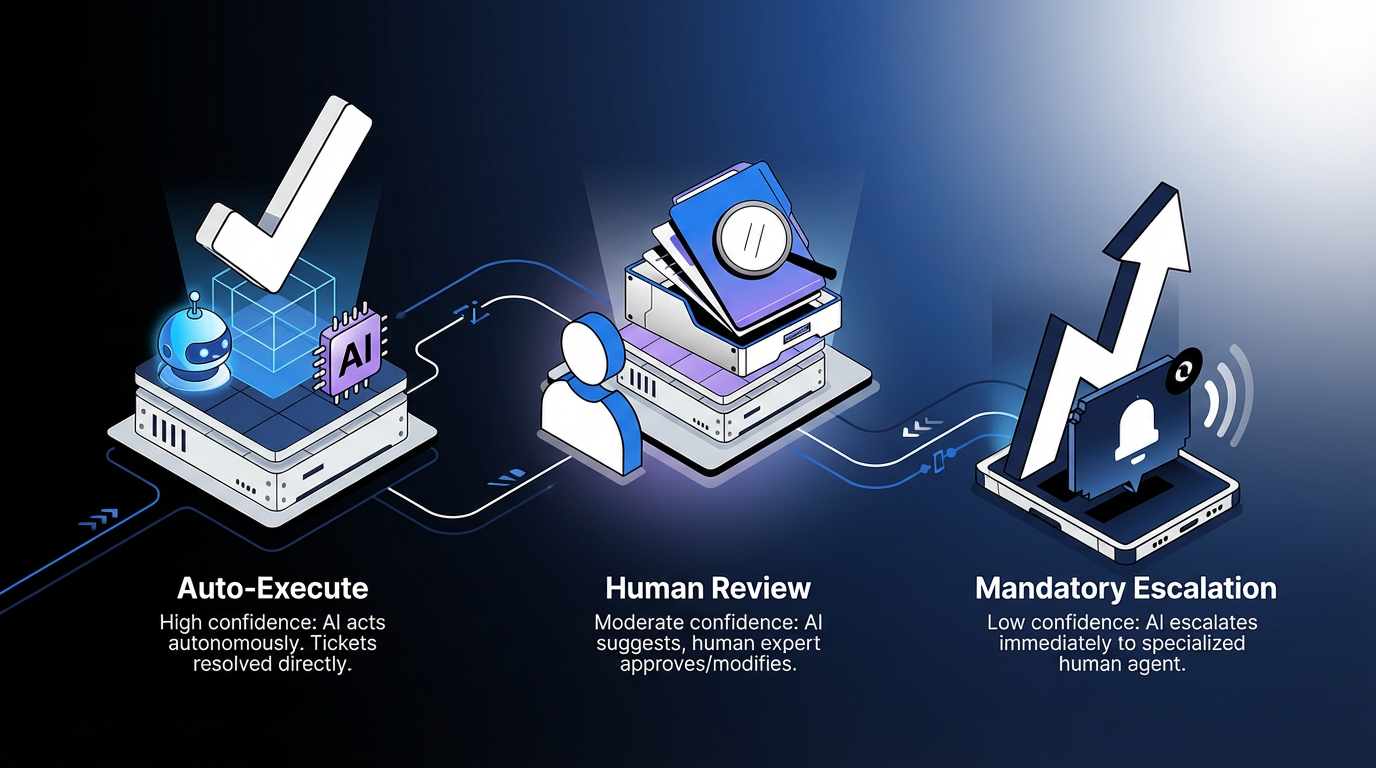
Certain high-risk categories often warrant mandatory human review regardless of confidence score: access provisioning for sensitive systems, change approvals with high potential blast radius, incident responses affecting regulated data environments, and financial transactions above defined thresholds. Elementum's Workflow Engine and Tasks and Approvals support configurable AI vs. human decision thresholds, intelligent routing with escalation paths, flexible approval chains, and full audit trails, with every agent action logged and revocable.
In practice, every autonomous action should have enough audit-trail detail to support review: the agent action taken, the confidence score at the time, every human review decision, all context transferred during escalation handoffs, and the agent and model versions at the time of each action. The audit record makes your AI program easier to defend when regulators, auditors, or your Chief Information Security Officer (CISO) requests evidence.
How Elementum Strengthens AI-Powered IT Service Desk Workflows
If you're building an AI-powered IT service desk workflow, the immediate priority is to put an orchestration layer in place that connects AI Agents, rules, human reviews, and existing tools into a single governed process.
Elementum's AI Workflow Orchestration Platform and AI Agent Orchestration capabilities connect AI Agents, business rules, and human decisions above existing ITSM tools in a single deterministic workflow. The no-code Workflow Engine enables faster deployment, while our Zero Persistence architecture means we never train on your data, replicate it, or warehouse it.
Elementum deploys first workflows in 30 to 60 days, depending on integration complexity and data readiness. AI service desk automation stalls most often when classification, routing, and resolution span disconnected tools without a shared governance layer. Elementum unifies all three into a single auditable workflow. Contact us to walk through your specific use case.
FAQs About AI-Powered IT Service Desk Automation
What Is The Realistic ROI Timeline For AI Service Desk Automation?
Many teams can start seeing measurable impact early, with industry sources suggesting steady-state deflection over time. The fastest path to ROI is to start with high-volume Tier 1 categories such as password resets and access requests, then measure impact against pre-AI baselines.
How Do We Maintain Governance Over AI Agents In Our Service Desk?
Configure confidence thresholds for each workflow step rather than using a single enterprise-wide policy. High-confidence actions can execute automatically with full audit logging, medium-confidence actions should require human review, and low-confidence actions should trigger mandatory escalation.
Will AI Service Desk Automation Replace Our Support Staff?
In most service desk environments, the primary impact on staffing is role redefinition. Tier 1 tasks move toward AI handling, while team members shift toward oversight, exception handling, complex problem-solving, and process improvement. Leadership communication about role changes is essential. Silence about how AI will affect the team tends to erode trust before the rollout reaches its intended scope.
Keep Reading
The Enterprise Guide to Agentic AI for ITSM
How to Build an IT Issue Escalation Process That Scales
AI Guardrails: How to Govern What AI Agents Can Access, Decide, and Do
Human-in-the-Loop vs. Human-on-the-Loop: When to Use Each for Enterprise Workflows
What Is Agentic AI Orchestration? An Enterprise Guide
9 Leading AI Platforms for Automating Help Desks in 2026: Comparison & Buying Guide