
How to Build an IT Issue Escalation Process That Scales
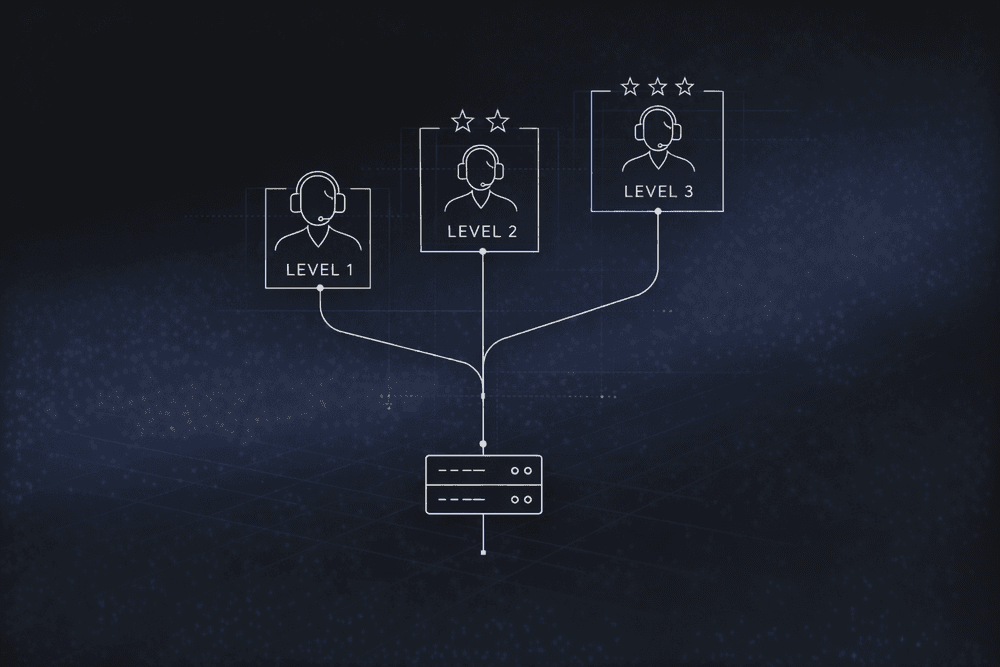
Unclear escalation paths can turn a minor IT incident into a much broader disruption. A defined IT issue escalation process routes the right issue to the right person at the right time, instead of leaving teams to improvise under pressure.
Many enterprise IT organizations have something they call an escalation process. Incident delay drivers often include team engagement, communication, and collaboration gaps. Engagement and communication breakdowns show up when a ticket bounces between tiers, stalls in a queue, or reaches a manager with little context on what happened before it landed with them
This guide walks through how to build an IT issue escalation process from scratch: the governance foundations, the tier structures, the escalation matrix mechanics, and where AI-driven workflow orchestration fits.
Plan for Governance Before Configuration
Escalation practices must be defined before workflow configuration begins. Most ITSM platforms provide the infrastructure to enforce escalation rules, but they don’t ship with your organization's escalation logic already built. Configuring tools before you document this logic produces workflows that automate undefined processes.
Governance means answering three foundational questions before anyone touches a workflow builder:
- Who owns what? Map each service, process, and tier to a Responsible, Accountable, Consulted, Informed (RACI) framework so it's clear who performs the work, who owns the outcome, and who provides input. Without clear ownership, the definitions of priority and risk can vary across teams, and the same incident gets handled differently depending on who picks it up.
- What triggers escalation? Documented criteria, not human judgment under pressure, should determine when a ticket moves. Priority matrices commonly frame priority around impact and urgency, typically using predefined priority and severity definitions.
- Which escalation path applies? Escalation types should be designed separately: functional escalation (transferring to a higher-level specialist based on skills) and hierarchical escalation (routing to management for authority or resource decisions).
These form the operating rules for every handoff that follows. When all three are explicit, escalation becomes a repeatable process instead of an argument during live incidents.
Getting the governance layer right can help reduce common escalation failures. Incident management research cited earlier also points to visibility and tool-fragmentation challenges for many organizations. Both issues trace back to governance gaps, such as unclear ownership, undefined escalation criteria, and inconsistent tier boundaries.
Define Your Tier Structure with Explicit Boundaries
A well-defined tier structure can help prevent two costly failure modes: over-escalation, where L1 pushes issues upward because the next step is unclear, and under-escalation, where high-severity issues stall at lower tiers because no one triggered the next action.
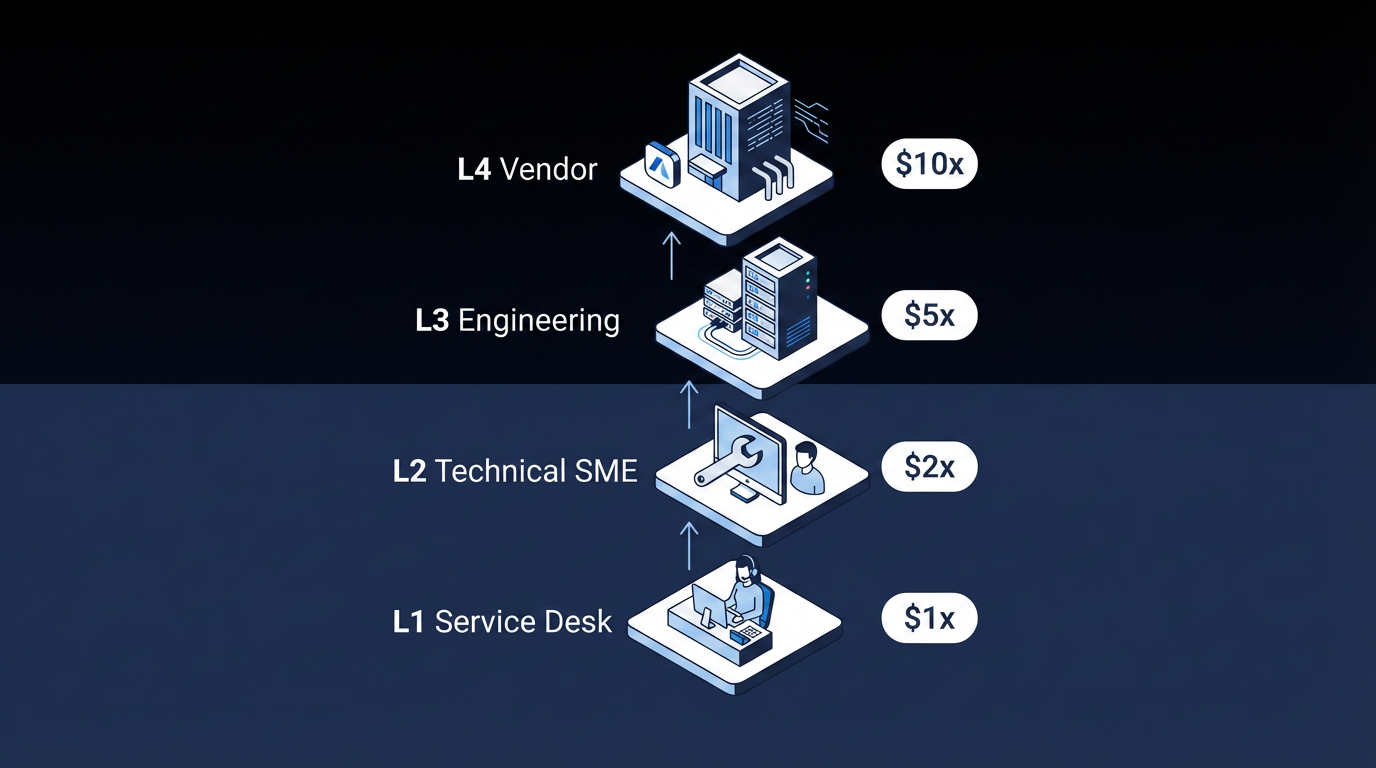
Tier definitions should include clear scope, defined resolution responsibilities, and explicit escalation triggers:
- L1 for Service Desk / First Contact: Initial intake, classification, basic troubleshooting using knowledge base articles and scripted procedures. Escalation triggers: no knowledge article resolves the issue, or the resolution-time threshold is exceeded.
- L2 for Technical Support / Subject Matter Experts (SMEs): Advanced troubleshooting beyond L1 capability. L2 is responsible for authoring priority guides and creating knowledge articles after resolving escalated incidents. Escalation triggers: issue exceeds L2 domain expertise, or engineering-level intervention is required.
- L3 for Expert / Engineering Teams: Deep infrastructure or application engineering expertise, vendor engagement, and major incident handling. Escalation triggers: internal L3 resources cannot resolve the issue, or a vendor defect is confirmed.
- L4 for Vendor / External Support: Vendor-specific defects, licensed software bugs, and hardware failures. Governed by underpinning contracts, not internal SLAs.
The four-tier structure gives each level a clear operating boundary and a clear handoff rule. When tier ownership is unclear, incidents can sit longer and require repeated work across groups.
The cost implications add up quickly. L2 engineers carry higher labor rates than L1 service desk agents, and L2 troubleshooting typically takes longer per ticket because the issues are more complex. Every unnecessary escalation from L1 to L2 burns that cost difference on a ticket that better knowledge coverage or Tier 1 training may have resolved at the lower tier.
Build the Escalation Matrix: Severity × Time × Role
An escalation matrix is the practical core of your IT issue escalation process. It maps severity level to time elapsed to escalation action to notified role, so your teams don’t have to invent the next step during a high-pressure incident.
Start with a severity classification tailored to your organization. Here's an example to help you get started:
| Severity | Definition | Example |
|---|---|---|
| S1: Critical | Full service outage; maximum business impact | Payment system down across all regions |
| S2: High | Significant degradation; major function affected | Enterprise resource planning (ERP) module unavailable for an entire business unit |
| S3: Medium | Partial impact; workaround available | Single user can't access a non-critical application |
| S4: Low | Minimal impact; cosmetic or informational | UI rendering issue with no functional effect |
Severity drives both urgency and stakeholder response. If severity definitions are vague, similar incidents get handled differently across teams.
Then layer SLA-based escalation triggers on top. The four-stage model below is a commonly used structure:
| SLA Percent Elapsed | Escalation Action |
|---|---|
| 0–50% | Notify assignment group |
| 50–75% | Alert senior IT management |
| 75–100% | Escalate to assignment manager; alert senior business stakeholders |
| 100% (Breach) | Full escalation; management notification and audit log entry |
Two implementation details often get missed in the IT escalation process. First, response and resolution SLAs should have distinct escalation paths. A response SLA breach and a resolution SLA breach point to different operational failures.
Second, define explicit rules for when the SLA clock can pause. Most ITSM platforms let teams pause the clock when a ticket is waiting on a vendor or a customer response. But without documented criteria for when pausing is permitted, teams may use it to protect their metrics instead. So SLA compliance looks fine, but the end user is still waiting.
Close the Knowledge Loop to Reduce Escalation Volume
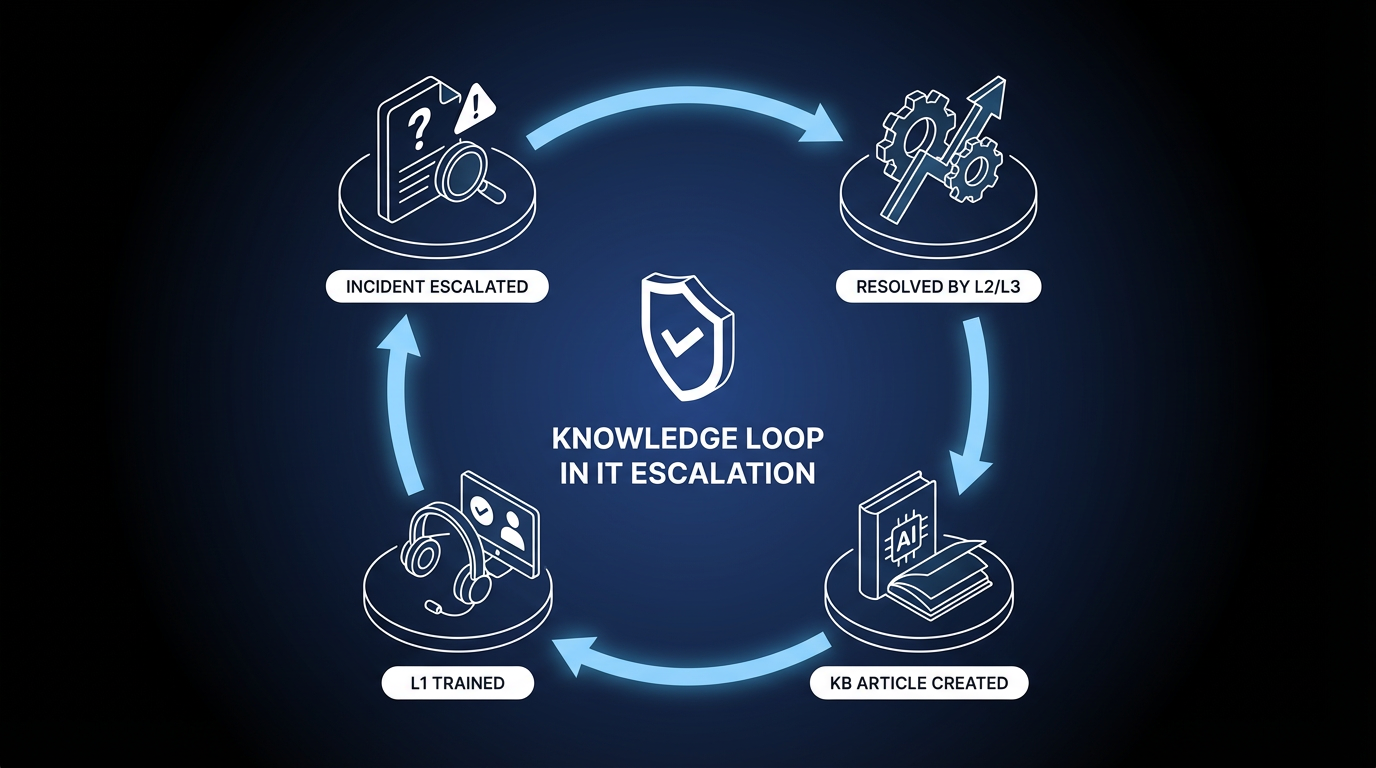
Knowledge management failures are a major and often overlooked driver of unnecessary escalation. Knowledge process gaps often stem from process issues, not only tools.
After resolving an escalated incident, the receiving team should educate the service desk and create a knowledge article if one does not exist. Feeding resolution knowledge back to L1 closes the gaps that drive escalations over time.
Additionally, incidents should not be escalated solely because the analyst did not know what to do. If your L1 team is escalating due to an incomplete knowledge base, this pattern indicates a knowledge management failure that should be fixed upstream.
Integrate AI and Workflow Orchestration
AI in IT service management (ITSM) can address several failure modes that make escalation processes harder to manage. Common ITSM AI features can include intelligent triage, intelligent categorization, and escalation capabilities that trigger before service-level thresholds are hit. AI can also include agent-advice capabilities such as routing that identifies suitable and available resolver groups.
The four capabilities listed below each map to a specific escalation challenge:
- Intelligent classification and severity assessment addresses ticket categorization issues that cause misrouting. Routing failures can stay hidden in normal reporting while resolution time keeps increasing.
- Predictive escalation can address under-escalation by triggering next-tier engagement before an SLA breach occurs, based on pattern recognition rather than elapsed-time rules alone. High-severity incidents can become more expensive while teams wait for formal breach thresholds.
- Skills-and-workload-based routing addresses handoff bottlenecks. In multi-team enterprise environments, agents copy updates manually between systems, statuses fall out of sync, and end users wait longer than necessary.
- Automated resolution for known issues applies the shift-left principle at scale by deflecting routine tickets before they enter the escalation path. Shift-left means moving resolution to earlier or lower-cost support tiers. Reducing avoidable ticket volume can leave higher tiers with more capacity for true exceptions.
The architectural question is where AI sits relative to the escalation process. An AI agent that classifies tickets can be useful. An AI agent that classifies tickets within a deterministic workflow that governs routing, SLA enforcement, approval chains, and stakeholder notifications operates inside a controlled system. AI can improve escalation, but it still needs governance around what happens next.
Measure Whether Your IT Escalation Process Is Working
A small set of key performance indicators (KPIs) can provide useful diagnostic coverage across your IT issue escalation process. Tracking KPIs individually is useful, and support metrics are often reviewed together to evaluate service desk effectiveness.
- First call or contact resolution (FCR): FCR predictor research links FCR to customer satisfaction in IT support. Results vary by channel mix and environment, but low FCR is a leading indicator of high escalation rates.
- Escalation rate: Track by priority level, ticket category, individual agent, and time of day. A rate that's too high suggests knowledge gaps or training deficiencies. A rate that's too low may signal under-escalation, which can also hurt mean time to resolve (MTTR).
- Mean time to resolve (MTTR): Segment by priority because aggregate MTTR can hide critical gaps between tiers.
- SLA compliance rate: Track response SLA and resolution SLA separately because they point to different failure modes.
- Cost per ticket by tier: The L1-to-L2 cost gap is a direct measure of escalation process efficiency. Reducing unnecessary escalation lowers labor cost over time.
Together, these metrics show whether your design is reducing both delay and avoidable handoffs. They also make it easier to identify whether the real problem is routing logic, staffing, knowledge coverage, or escalation discipline.
Apply a Governed IT Issue Escalation Process at Enterprise Scale
A strong IT issue escalation process is an operating model for deciding who acts, when they act, and how the next step gets enforced before delay compounds.
Elementum's Open Orchestration Platform is designed for governed, auditable escalation at scale. The Workflow Engine is a visual, no-code builder that treats humans, business rules, and AI agents as equal first-class actors in the same process, so an escalation workflow can classify a ticket with AI, apply deterministic SLA rules, route to the right tier based on skills and workload, and trigger hierarchical notifications within one flow.
The Intelligent Front Door gives employees one entry point across IT, HR, Procurement, and other functions. AI agents classify requests, check knowledge sources, and either resolve automatically or route to a specialist with full context.
Configurable confidence thresholds determine which decisions AI handles autonomously and which require human approval. Every agent action is logged with a full audit trail for SOX, HIPAA, and GDPR compliance. And with our Zero Persistence architecture, we never train on your data, never replicate it, and never warehouse it.
Elementum integrates with SAP, Salesforce, Oracle, and other enterprise systems through native integrations and APIs, and connects to 200+ data sources via CloudLinks. Production deployment takes 30 to 60 days, and Elementum helps build the first app, then the customer takes over and builds independently without permanent vendor engineering.
Contact us to see how Elementum applies governance, SLA enforcement, and AI-driven routing to your escalation workflows.
FAQs About IT Issue Escalation Processes
When Should an IT Issue Be Escalated?
Escalation should be triggered by predefined criteria, not individual judgment. Common triggers include urgency, impact, severity, SLA thresholds approaching breach, expanding incident scope, and cases where the current tier lacks the required skills.
What Should Be Documented Before Escalating a Ticket?
At minimum, document current categorization and priority, all steps already taken, current business impact, who has been involved, and any workarounds applied. Work notes should be mandatory before the escalation action is triggered.